

Exciting New Features

Enhance your app’s capabilities with advanced features that streamline operations and improve user experience.
  • null
    Support for OrangeMoney, Xendit, and MidTrans makes payments smoother and more secure.
  • null
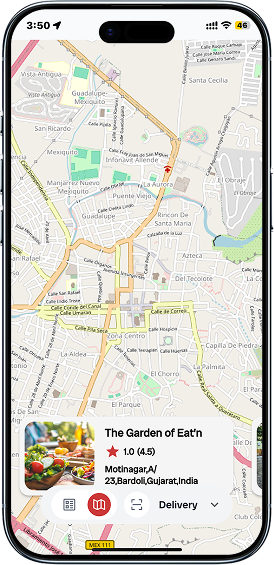
    Open Street Map (OSM) Integration
  • null
    Dynamic Onboarding Screen
  • null
    Automatic Admin Commission
  • null
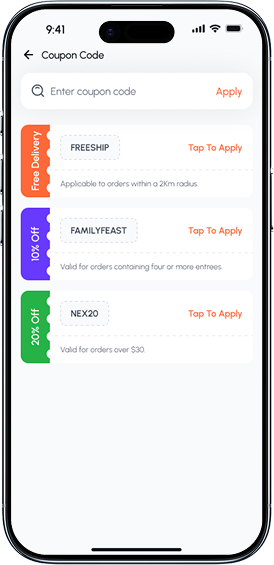
    Verification Documents for Restaurants & Drivers
  • null
    New Withdrawal Payment Methods

Your Journey with

Watch our video to see Emart is the Delivers Best Multi-Vendor Services like Car Rental App, Food Delivery App, eCommerce App, Parcel Service App, Taxi Booking App.
eMart Multivendor Delivery Service Workflow
eMart eCommerce Service Workflow
eMart onDemand Service Workflow
eMart Parcel Delivery Service Workflow
eMart Car Rental Service Workflow
eMart Cab Service Workflow

Emart App Suite: Revolutionizing Multi-Vendor Services

Your gateway to a plethora of services from various vendors, all accessible through one user-friendly platform.

Empowered by Leading-edge Technologies

Complete in stability, scalability and security payment gateway options.

Your All-in-One Solution for Multi-Vendor Services

Emart: Your one-stop solution for multi-vendor services.
Download now for seamless convenience.

Effortless Everything

Delivers Best Multi-Vendor Services like Car Rental App, Food Delivery App, eCommerce App, Parcel Service App, Taxi Booking App.
  • null
    Multi-vendor
  • null
    E-Commerce
  • null
    Cab Service
  • null
    Parcel Service
  • null
    Rental Service
  • null
    Saloon Service
  • null
    On Demand

Payment Gateways

Complete in stability, scalability and security payment gateway options.
null
null
null
null
null
null
null
null
null
null
null
null
emart-multi-vendor-image-1
  • Dynamic Slider

    Our slider adapts to your preferences, making every swipe a delightful discovery.
  • Categorized Items

    In this page customer can see vivid variety in grocery items category like fruits, vegetables, dairy etc.
  • New Arrivals

    Discover the latest treasures offering our diverse range of vendors!
  • Popular Stores

    a diverse marketplace hub featuring a curated selection of popular stores.
emart-multi-vendor-image-2
  • Image Slider

    Product Image Slider feature, designed to elevate your multivendor experience to new heights.
  • Favorite Product

    With our 'Favorite Product' option, you can effortlessly curate your own personal wishlist within our app.
  • Share Product

    Allows users to easily share details and links to specific products with others to communication channels.
  • Exclusive Offers

    After creating the coupon, you can get list of coupons with discount offer and expired date.
  • Numerous Categories

    Easily categorize items with this feature and help customers to choose and satisfy a craving.
emart-multi-vendor-image-3
  • Product Details

    Product details providing customers with vital information to make informed purchasing decisions.
  • Product Reviews

    Product reviews are the lifeblood of any multivendor app, offering valuable insights for potential buyers.
  • Add to Cart

    Add to Cart" is a fundamental feature that allowing users to collect items they wish to purchase.
  • Store Details

    This section serves as a comprehensive hub of information about a particular store or seller.
emart-multi-vendor-image-4
  • Find Nearest Store

    Discover the convenience of finding the nearest physical store to fulfill your shopping needs.
  • Store Info

    Providing comprehensive details about store to enhance customer experience and foster trust.
  • Location Info

    Location Info for details about the physical location of a product, seller, or service provider.
  • View Ratings

    Accessing and evaluating the ratings and reviews provided by other customers.
emart-multi-vendor-image-5
  • Cart Products

    This section serves as a virtual shopping basket where users can gather items they intend to purchase.
  • Manage Cart

    Customers can conveniently add, remove, or adjust quantities of desired items in their cart.
  • Redeem Coupon

    Simply enter your coupon code at checkout to instantly apply your discount. It's quick & hassle-free.
  • Remarks

    Remarks for as a vital channel for both users and developers to communicate feedback, suggestions.
  • Order Summary

    It’s give you a quick and detailed overview of your transaction and transparency every step of the way.
emart-multi-vendor-image-6
  • Cart Products

    This section serves as a virtual shopping basket where users can gather items they intend to purchase.
  • Manage Cart

    Customers can conveniently add, remove, or adjust quantities of desired items in their cart.
  • Redeem Coupon

    Simply enter your coupon code at checkout to instantly apply your discount. It's quick & hassle-free.
  • Remarks

    Remarks for as a vital channel for both users and developers to communicate feedback, suggestions.
  • Order Summary

    It’s give you a quick and detailed overview of your transaction and transparency every step of the way.
emart-multi-vendor-image-7
  • Offers List

    Browse our Offers List for exclusive deals and discounts on a wide range of products!
  • Discount Label

    Unlock exclusive savings offers on your favorite products with our Discount Label.
  • Discount Coupon Code

    Simply apply the coupon at checkout and enjoy unbeatable discounts on a wide range of products.
  • View Ratings

    Accessing and evaluating the ratings and reviews provided by other customers.
multivendor_store_img1
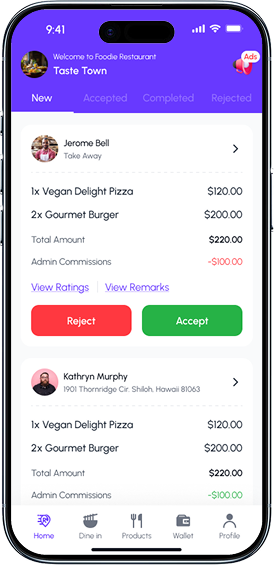
  • New Order Management

    Easily review all newly placed customer orders with real-time updates, allowing quick decision-making and smooth workflow management.
  • Accept/Reject Orders

    Approve or decline orders instantly based on availability, preparation time, or restaurant capacity — ensuring efficient service handling.
  • Order Details Overview

    View complete order breakdown including item list, quantity, pricing, total amount, and commissions in one clean, organized interface.
  • Customer Information

    Access important customer details such as name, address, and order type (Takeaway/Delivery) to streamline fulfillment.
  • Commission Transparency

    Clear visibility of admin commissions ensures accurate earnings calculation for the restaurant owner.
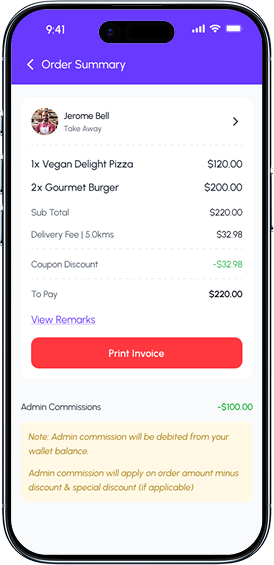
multivendor_store_img2
  • Detailed Order Breakdown

    Displays a clear and itemized list of all products ordered, along with quantities and pricing for full transparency.
  • Sub Total & Delivery Fee Display

    Presents an accurate calculation of the subtotal and delivery charges, ensuring users understand the complete cost structure.
  • Applied Coupon Discount

    Shows automatically applied coupon savings, helping customers track their discounts in real time.
  • Net Payable Amount

    Highlights the final amount to be paid in a concise, easy-to-read format for quick checkout decisions.
  • View Remarks Section

    Allows users to access special customer instructions or notes to ensure accurate order preparation.
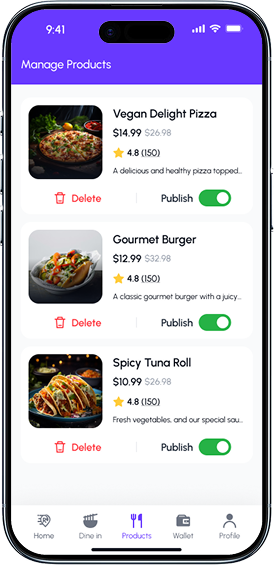
multivendor_store_img3
  • Product Overview Card

    Each product is displayed in a clean, structured card showing the image, name, pricing, rating, and short description for easy management.
  • Product Rating & Reviews

    Displays product rating and number of reviews to help sellers understand customer feedback at a glance.
  • Publish / Unpublish Toggle

    Empowers sellers to control product visibility in real time, enabling quick activation or deactivation of menu items.
  • Delete Product Option

    Allows vendors to remove unwanted or outdated items from their menu with a single tap.
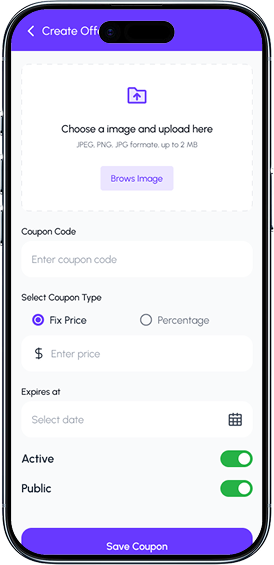
multivendor_store_img4
  • Image Upload for Offer Banner

    Allows sellers to upload a promotional image to visually represent the coupon, making offers more attractive to customers.
  • Flexible Coupon Type Selection

    Choose between Fixed Price Discount or Percentage-Based Discount, giving sellers full control over promotion style.
  • Custom Discount Value

    Enter the exact discount amount based on the selected coupon type for accurate offer creation.
  • Active/Inactive Toggle

    Enable or disable the coupon at any time, allowing sellers to manage limited-time offers instantly.
  • Public/Private Visibility Control

    Choose whether the coupon is visible to all users or restricted to specific customers or campaigns.
multivendor_store_img5
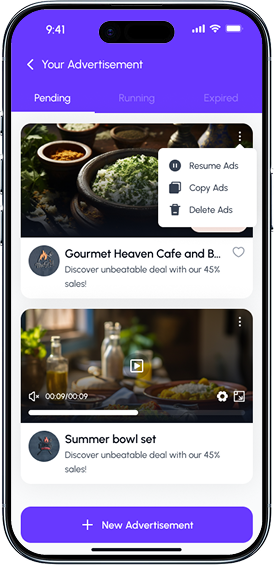
  • Organized Ad Status Tabs

    Easily navigate between Pending, Running, and Expired advertisements for streamlined campaign management.
  • Ad Preview Cards

    Each advertisement is displayed with an image or video preview, helping sellers quickly identify and manage their promotional content.
  • Ad Actions Menu

    A convenient options menu allowing users to Resume, Copy, or Delete ads directly from the card for fast workflow control.
  • Video Ad Support

    Includes built-in video playback with controls, enabling sellers to preview and manage multimedia advertisements.
  • Campaign Details Preview

    Displays key information such as promotion title and offer message, giving a clear snapshot of each ad's purpose.
multivendor_driver_img1
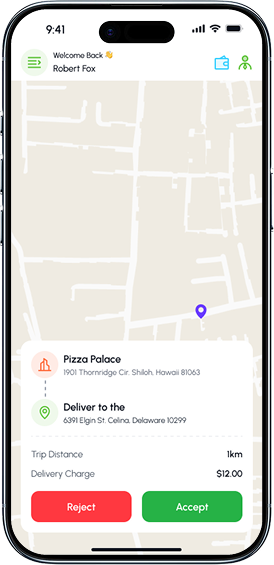
  • Accept / Reject Order Options

    Provides simple, high-visibility buttons for drivers to accept or decline delivery requests instantly.
  • Interactive Map View

    Displays the delivery location and surrounding route on a clean, minimal map interface for quick navigation reference.
  • Pickup & Drop Location Details

    Shows clear information for both the restaurant pickup point and the customer delivery address, ensuring accurate order fulfillment.
  • Trip Distance Calculation

    Automatically calculates and displays the total distance for the delivery route to help drivers understand travel requirements.
  • Delivery Charge Visibility

    Shows the exact delivery fee upfront, helping drivers make quick and informed decisions.
multivendor_driver_img2
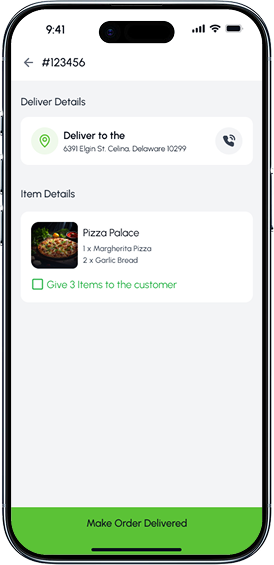
  • Order ID Display

    Shows the unique order number at the top, helping drivers quickly identify and verify the correct delivery task.
  • Customer Delivery Details

    Provides the exact delivery address along with a dedicated call button, enabling direct communication if needed.
  • Item Summary Card

    Displays all ordered items with quantities, ensuring drivers deliver the correct products to the customer.
  • Restaurant Information Preview

    Shows the source restaurant and ordered items visually, helping drivers double-check accuracy at a glance.
multivendor_driver_img3
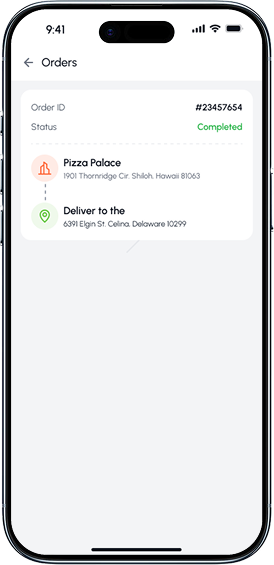
  • Order ID Display

    Shows a unique order identifier for quick tracking and reference, helping users easily locate past orders.
  • Order Status Indicator

    A clear status label (Completed) displayed in green to visually confirm successful delivery at a glance.
  • Pickup Location Details

    Shows the restaurant name and address, providing a traceable record of where the order originated.
  • Delivery Destination Information

    Displays the customer’s delivery address, ensuring complete clarity of the order’s delivery route.
multivendor_driver_img4
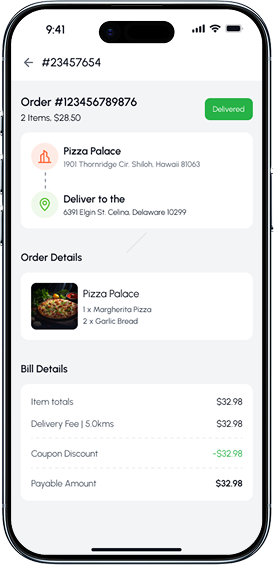
  • Comprehensive Order Summary

    Displays the order number, total item count, and order value upfront, giving users a quick overview of the purchase.
  • Delivery Status Badge

    A clear, color-coded indicator (Delivered) that instantly communicates the completion status of the order.
  • Pickup & Delivery Information

    Shows both the restaurant’s address and the delivery destination in a connected visual flow, ensuring full clarity of the delivery route.
  • Itemized Order Details

    Provides a detailed breakdown of all ordered items with quantities and product images, helping users verify their purchase.
  • Transparent Billing Breakdown

    Shows item total, delivery fee, discounts, and the final payable amount with clear formatting for easy understanding.
multivendor_driver_img5
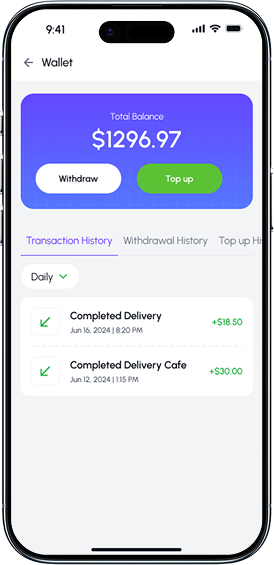
  • Total Balance Overview

    Displays the user’s current wallet balance in a visually highlighted section for instant financial insight.
  • Withdraw & Top-Up Actions

    Provides quick access buttons to withdraw earnings or add funds, enabling smooth and simple wallet management.
  • Tabbed Wallet Navigation

    Separate tabs for Transaction History, Withdrawal History, and Top-Up History help users access financial records effortlessly.
  • Transaction Filter Options

    Allows users to filter transactions by time period (e.g., Daily, Weekly, Monthly), improving data visibility and navigation.
  • Detailed Transaction Cards

    Each entry displays transaction type, date, time, and amount earned or spent, ensuring complete clarity of financial activity.
emart-e-commerce-cust-image-1
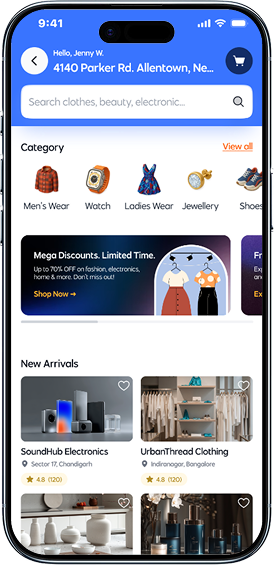
  • Category Quick Access

    Horizontal category icons enable fast navigation to popular product segments such as Men’s Wear, Watches, Ladies Wear, Jewellery, and Shoes.
  • Promotional Offer Banner

    A visually engaging promo card highlights ongoing discounts and limited-time offers, encouraging users to explore deals.
  • New Arrivals Section

    Showcases trending and newly added products with high-quality images and key details to capture user interest instantly.
  • Shop Cards with Ratings

    Product/Store cards display images, brand names, locations, and star ratings to help users make informed shopping decisions.
  • Wishlist Shortcut

    A heart icon on each product card lets users quickly add items to their wishlist for later purchase.
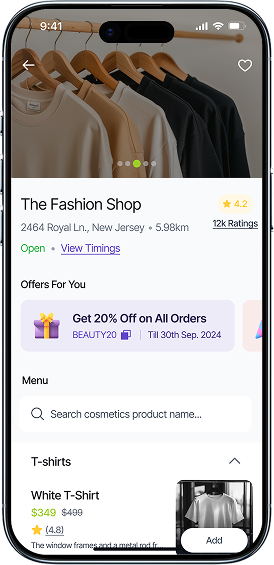
emart-e-commerce-cust-image-2
  • Store Banners

    A visually appealing header image showcases the store’s theme and product style, enhancing brand identity.
  • Store Information Section

    Displays store name, address, distance, and rating details clearly, helping users evaluate the shop at a glance.
  • Live Store Status

    Shows whether the store is currently Open, along with a quick link to view store timings for planning purchases.
  • Special Offers for You

    Highlights personalized deals and coupon codes, encouraging users to take advantage of ongoing discounts.
  • Product Card with Quick Add

    Each product card includes pricing, discount, rating, and a quick “Add” button for fast shopping.
emart-e-commerce-cust-image-3
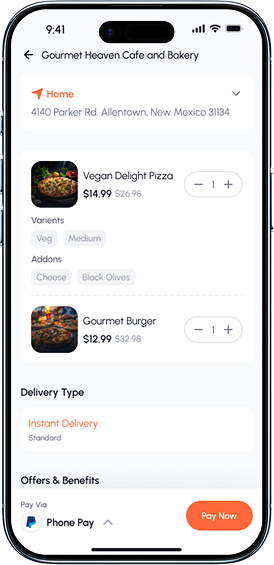
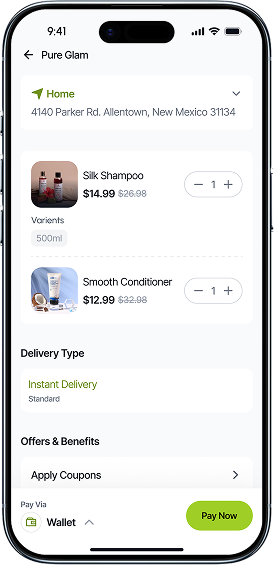
  • Saved Delivery Address

    Displays the user’s selected delivery location at the top for quick confirmation, with an option to expand and change the address easily.
  • Product List with Variants

    Shows all items added to the cart along with product variants (like size or volume), ensuring clarity before checkout.
  • Quantity Selector

    A smooth +/– control allows users to adjust item quantities directly within the cart for fast updates.
  • Delivery Type Options

    Allows users to choose between delivery methods such as Instant Delivery or Standard, offering flexibility and convenience.
  • Offers & Benefits Section

    A dedicated section for applying coupons and viewing promotional benefits to maximize savings.
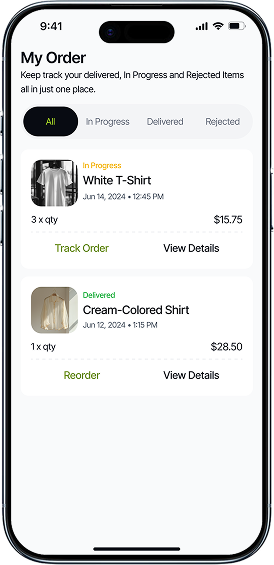
emart-e-commerce-cust-image-4
  • Order Status Tabs

    Organized tabs for All, In Progress, Delivered, and Rejected orders help users filter and manage their purchase history effortlessly.
  • Order Summary Cards

    Each order card displays product image, item name, quantity, status, and total price, offering a quick snapshot of the order details.
  • Real-Time Status Labels

    Clear indicators like In Progress and Delivered allow users to instantly understand the current stage of each order.
  • Track Order Option

    Provides real-time tracking for ongoing orders, enabling customers to monitor delivery progress with ease.
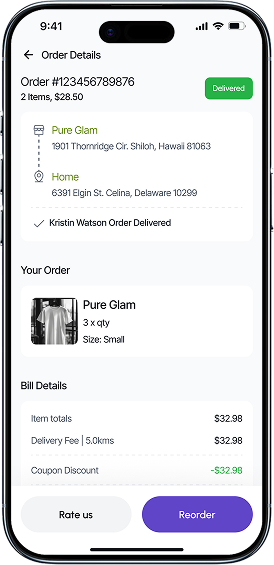
emart-e-commerce-cust-image-5
  • Detailed Order Summary

    Displays the order number, total items, and amount clearly, helping users quickly understand their purchase information.
  • Delivery Status Badge

    A visible “Delivered” label confirms the successful completion of the order, giving users instant clarity.
  • Pickup & Delivery Information

    Shows the store address and customer delivery location in a connected visual flow, enhancing transparency and tracking.
  • Product Overview Section

    Lists each ordered product with an image, quantity, and variant details such as size, ensuring accuracy for the customer.
  • Bill Breakdown

    A clear cost summary showing item totals, delivery fee, discounts, and final payable amount for complete price transparency.
e-commerce_store_img1
  • Order List

    App provides users with a comprehensive overview of their past purchases and order history.
  • Order Details

    app typically include comprehensive information about a customer's purchase.
  • Delivery Location

    The address where you'd like your items delivered for your order reaches you promptly and conveniently.
  • Order Status

    Tracker is your personal assistant in keeping you informed about every step of your order status.
e-commerce_store_img2
  • Product List

    The store owner can view the list of product which is listed by store owner
  • Delete Product

    Sellers with the capability to remove products from the platform's inventory
  • Publish/Unpublish Product

    The Publish/Unpublish Product feature empowers sellers to control the visibility of their products.
  • Add Product

    Effortlessly introduce new items to their virtual storefront, enriching the variety and appeal.
e-commerce_store_img3
  • Offers List

    Browse our Offers List for exclusive deals and discounts on a wide range of products!
  • Discount Price

    Unlock exclusive savings offers on your favorite products with our Discount Price.
  • Discount Coupon

    The Publish/Unpublish Simply apply the coupon at checkout and enjoy unbeatable discounts on a wide range of products.
  • Create Offer

    Seamlessly generate promotions, discounts, and exclusive deals to attract customers and boost sales.
e-commerce_store_img4
  • Coupon Code

    Effortlessly create custom codes to boost sales and enhance customer engagement.
  • Coupon Types

    Unlock savings with our diverse range of coupon types of fix price or percentage offer.
  • Coupon Expires

    Unlock exclusive savings with our limited-time coupon codes.
  • Activate or Deactivate Coupon

    Effortlessly manage discounts with our Activate or Deactivate Coupon feature
e-commerce_store_img5
  • Withdraw Payment

    Securely withdraw earnings from your the app with quick and ease access.
  • Wallet Balance

    app allows users to store funds within their account for convenient and swift transactions.
  • Transaction History

    app provides users with a comprehensive overview of their past purchases and financial transactions.
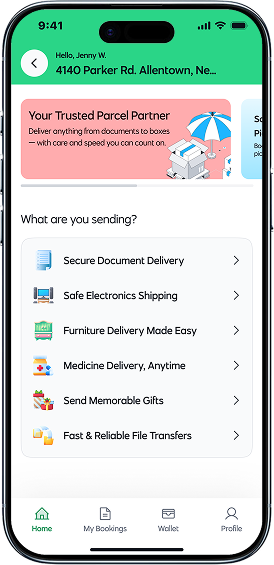
emart-parcel-image-1
  • Personalized User Greeting

    Displays the user’s name and saved address to create a familiar and personalized parcel booking experience.
  • Service Highlight Banner

    A visually appealing promo banner introduces the parcel service as a trusted delivery partner with clear, friendly messaging.
  • Category-Based Parcel Options

    Users can choose from multiple parcel types such as documents, electronics, furniture, medicines, gifts, and files—making selection quick and intuitive.
  • Secure Document Delivery

    A dedicated option for delivering important paperwork safely and efficiently.
emart-parcel-image-2
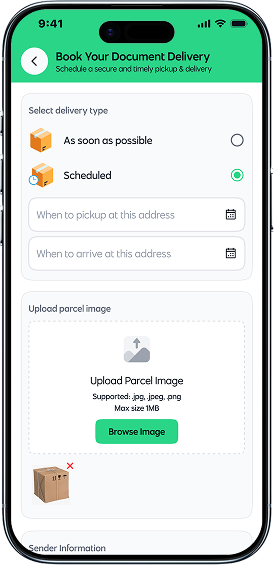
  • Flexible Delivery Type Selection

    Users can choose between As soon as possible or Scheduled delivery, providing full control over pickup and drop-off timing.
  • Scheduled Date & Time Picker

    When scheduling a delivery, users can select pickup and arrival date/time through intuitive calendar inputs for precise planning.
  • Parcel Image Upload

    Allows users to upload a parcel photo (jpg, jpeg, png) to help delivery partners identify items easily and avoid mistakes.
  • Optimized for Quick Booking

    The flow minimizes steps while still capturing essential information, making the document booking process efficient and stress-free.
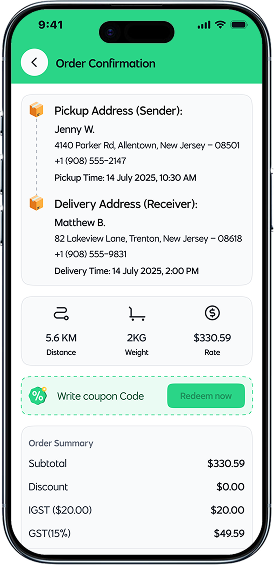
emart-parcel-image-3
  • Sender & Receiver Address Details

    Displays complete pickup and delivery addresses, including names, phone numbers, and exact scheduled timings for full clarity.
  • Pickup & Delivery Timings Overview

    Shows clearly defined pickup and drop-off time slots, helping users verify the accuracy of scheduled deliveries before confirming.
  • Delivery Metrics Snapshot

    Provides quick insights into key delivery details—distance, parcel weight, and estimated delivery rate—in a visually simple, icon-based layout.
  • Coupon Code & Redeem Option

    Users can enter discount codes and redeem them instantly, allowing cost savings at the final confirmation step.
  • Transparent Billing Summary

    Breaks down the subtotal, taxes (IGST, GST), and final payable amount, ensuring complete cost transparency.
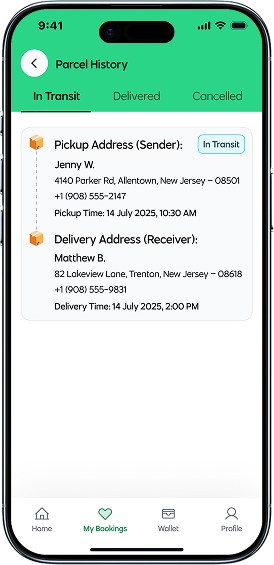
emart-parcel-image-4
  • Organized Parcel History Tabs

    Users can switch between In Transit, Delivered, and Cancelled tabs, offering a clear and intuitive way to track all parcel statuses.
  • Real-Time Delivery Status Tag

    A visible status label shows “In Transit” to instantly inform users about the current stage of their delivery.
  • Sender Address Overview

    Displays complete pickup details including sender name, address, phone number, and pickup time for quick reference.
  • Receiver Address Overview

    Shows receiver’s name, delivery address, contact information, and expected delivery time for better tracking and transparency.
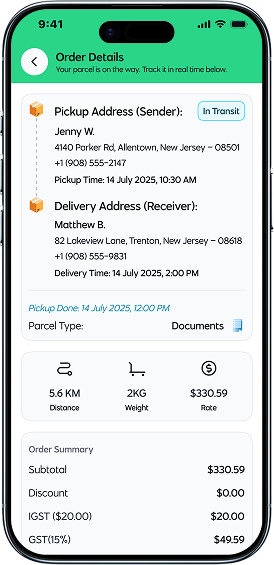
emart-parcel-image-5
  • Live Delivery Status Indicator

    A clear “In Transit” badge instantly shows the current stage of the delivery, helping users understand progress at a glance.
  • Complete Pickup & Delivery Details

    Both sender and receiver information — including name, address, phone number, and scheduled times — are neatly organized for easy review.
  • Parcel Type Information

    Shows the type of parcel being delivered (e.g., Documents), ensuring clarity for both users and delivery partners.
  • Delivery Metrics Overview

    Important delivery details like distance, parcel weight, and rate are highlighted with icons for fast and intuitive understanding.
  • Detailed Order Summary

    Breakdown of subtotal, discounts, and taxes (IGST, GST) provides transparency before the final payment or review.
parcel_shipper_img1
  • Driver Availability

    Driver can ensures timely enable or disable their availability for work
  • Trip Distance

    It helps driver gauge the length of their journey and is a crucial factor in determining the fare for the ride.
  • Pickup and Drop-off Location

    Our Pickup and Drop-off Location for cab service offers easy access for drivers alike.
  • Accept or Reject Request

    Swiftly Accept or Reject incoming ride requests, ensuring flexibility and control over your schedule.
parcel_shipper_img2
  • Sender and Reciever Details

    Verify essential sender and receiver information for a secure and pleasant parcel service experience.
  • Customer Destination

    Your destination for hassle-free parcel delivery. Enjoy swift, reliable, and secure shipping to your doorstep.
  • Call or Message

    Driver can communicate with sender and receiver via call or message for hassle free delivery service.
  • Track Route Via Map

    Efficiently navigate parcel deliveries with our Track Route Via Map feature.
parcel_shipper_img3
  • Orders History

    Keep track of your orders with accessible records of your past orders.
  • Customer Details

    This section gathers essential information about sender and receiver availing service.
  • Pickup and Drop-off locations

    Shipper can view pickup and drop-off locations of parcel order.
  • Parcel Details

    Providing essential information package dimensions, weight, and any special handling instructions.
parcel_shipper_img4
  • Order Details

    Keep track of your journey with accessible records of your past rides
  • Customer Details

    Easily view past trips customer detail like name, image, dates, destinations, fares, and driver information.
  • Parcel Details

    Providing essential information package dimensions, weight, and any special handling instructions.
  • Order Summary

    A concise overview detailing of your booking total amount, discount, tax.
parcel_shipper_img5
  • Total Balance

    app allows users to store funds within their account for convenient and swift transactions.
  • Transaction History

    App provides users with a comprehensive overview of their past financial transactions.
  • Withdraw Balance

    Securely withdraw earnings from your the app with quick and ease access.
  • Withdraw Balance History

    App provides users with a comprehensive overview of withdraw transactions.
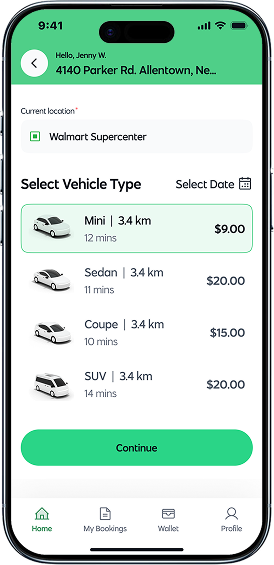
rental_customer_img1
  • Auto-Detected Current Location

    Displays the user’s current location automatically, helping them start the booking process quickly and accurately.
  • Vehicle Type Selection

    A clear list of available vehicle options (Mini, Sedan, Coupe, SUV), each displaying distance, expected arrival time, and price.
  • Transparent Pricing Details

    Each vehicle card highlights its price upfront, helping users compare and choose based on their budget.
  • Select Date Option

    A dedicated date picker allows users to schedule rides for later, supporting both immediate and planned bookings.
  • Distance & ETA Indicators

    Shows the distance of each available vehicle and the estimated time to reach the user, improving decision-making.
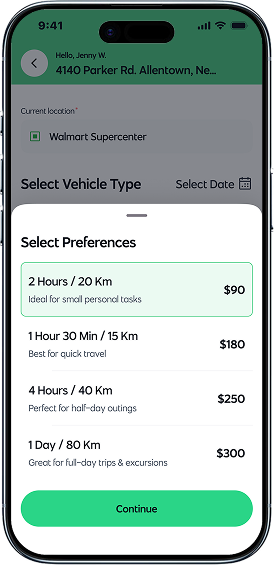
rental_customer_img2
  • Multiple Time & Distance Packages

    Users can choose from tailored ride packages such as 2 Hours / 20 Km or 1 Day / 80 Km, depending on their needs.
  • Clear Pricing for Each Package

    Every preference option prominently displays its price, helping users compare and select quickly.
  • Short Descriptions for Guidance

    Each package includes a helpful one-line description (e.g., “Ideal for small personal tasks”) to guide users based on use-case.
  • Flexible Ride Options

    Packages support different trip types — short errands, quick travel, half-day plans, or full-day excursions — enhancing versatility.
rental_customer_img3
  • Pickup Location & Time Summary

    Shows the selected pickup location along with the exact date and time, allowing users to quickly verify their starting point before confirming.
  • Selected Preference Overview

    Displays the chosen rental package (e.g., 2 Hours / 20 Km) along with its price and a short description, ensuring clarity on what the user has opted for.
  • Vehicle Details & Rental Dates

    Includes the selected vehicle type (Mini, Sedan, etc.), its approximate arrival time, and the rental duration dates for complete transparency.
  • Clear Order Summary Breakdown

    Itemized pricing including subtotal, discounts, IGST, GST, and the final payable amount, helping users understand the cost structure easily.
rental_customer_img4
  • Preferred Payment Section

    Displays the user’s most commonly used or convenient payment options such as Wallet Balance and Cash on Delivery, making checkout faster and simpler.
  • Wallet Balance Overview

    Shows available wallet funds at a glance, helping users decide instantly if they want to pay using their wallet.
  • Wide Range of Payment Gateways

    Includes globally trusted platforms like PayPal, Stripe, Razorpay, PayStack, and more — ensuring maximum accessibility for users across regions.
  • Clear Payment Icons for Recognition

    Each payment method includes a recognizable brand icon, making selection easier and improving visual clarity.
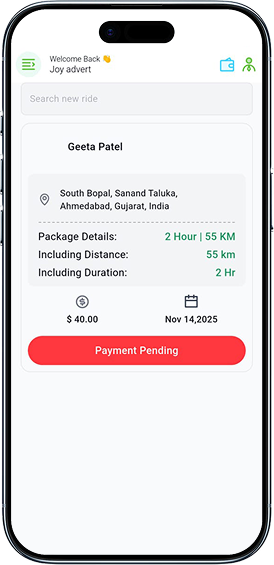
rental_driver_img1
  • Quick Ride Search Bar

    Allows users to instantly search for ongoing, past, or upcoming rides, improving navigation and usability.
  • Rider Information Card

    Displays the customer’s name clearly at the top of the card, helping drivers or service providers identify the booking at a glance.
  • Accurate Pickup Location Details

    Shows full address information with a location icon, providing clarity on where the ride begins.
  • Package Details Overview

    Highlights package duration and included distance (e.g., 2 Hours | 55 KM) to quickly remind users of the ride’s key terms.
  • Fare & Date Summary

    Shows the total payable amount along with the scheduled service date, making the ride summary complete and transparent.
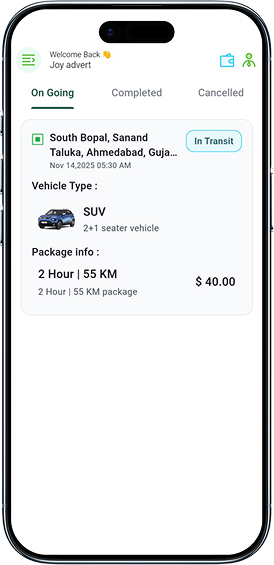
rental_driver_img2
  • Live Ride Status Indicator

    A clear In Transit badge highlights that the ride is currently active and in progress, giving users instant status visibility.
  • Pickup Location Overview

    Displays the full pickup address along with the scheduled date and time, ensuring users always know where and when the ride started.
  • Vehicle Type Details

    Shows the selected vehicle (e.g., SUV – 2+1 seater) along with a vehicle image for instant recognition and clarity.
  • Package Information Summary

    Provides complete package details such as 2 Hour / 55 KM, helping users understand the duration and distance included in the booking.
  • Fare Transparency

    Displays the package cost upfront, ensuring there are no surprises during or after the ongoing ride.
rental_driver_img3
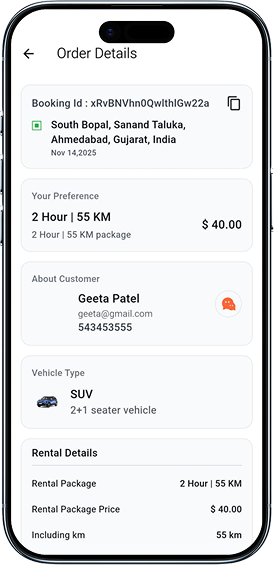
  • Booking ID & Quick Copy Option

    Displays the unique booking ID with a one-tap copy icon, making it easy for users to share or reference their booking details.
  • Pickup Location & Date Summary

    Shows the exact pickup address along with the scheduled date, ensuring users have complete clarity about their ride’s starting point.
  • Selected Package Overview

    Highlights the chosen rental package (2 Hour / 55 KM) along with its price and a short package description for instant reference.
  • Customer Information Section

    Displays customer details such as name, email, and phone number in a clean, dedicated block — making communication easy and accessible.
  • Rental Details Breakdown

    Provides a detailed summary of the rental package, included kilometers, and pricing — ensuring users fully understand what is covered.
rental_driver_img4
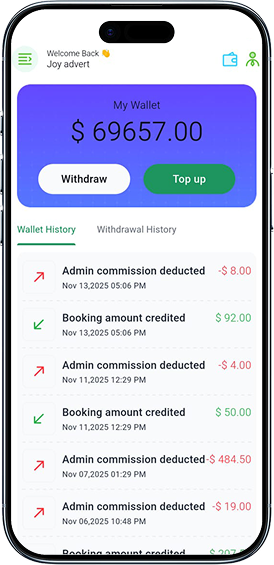
  • Real-Time Wallet Balance Display

    Shows the user’s current wallet balance in a bold, card-style header, giving instant visibility of available funds.
  • Quick Actions: Withdraw & Top Up

    Two prominently placed buttons allow users to easily withdraw money or add funds to their wallet with a single tap.
  • Tabbed Transaction Navigation

    Separate tabs for Wallet History and Withdrawal History help users switch between transaction types effortlessly.
  • Detailed Transaction List

    Each transaction entry clearly displays the type (commission deducted or amount credited), ensuring full financial transparency.
  • Timestamped Records

    Every transaction includes the exact date and time, offering precise bookkeeping and improved trust.
cab_customer_img1
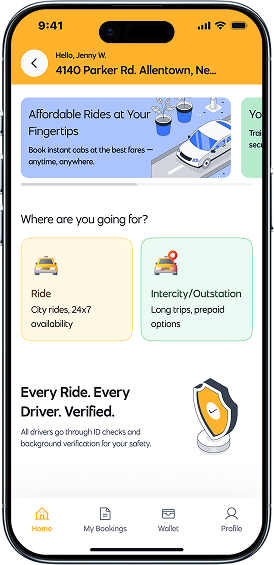
  • Smart Location Display

    Shows the user’s active location at the top, helping them quickly verify where the ride booking will start.
  • Promotional Banners

    Eye-catching banners showcase offers like Affordable Rides at Your Fingertips, encouraging users to explore deals and services.
  • Ride Category Selection

    Two clear ride types — City Rides and Intercity/Outstation — help users choose the right option based on their travel needs.
  • Safety Assurance Section

    A dedicated message stating Every Ride. Every Driver. Verified. builds trust by emphasizing driver background checks and user safety.
cab_customer_img2
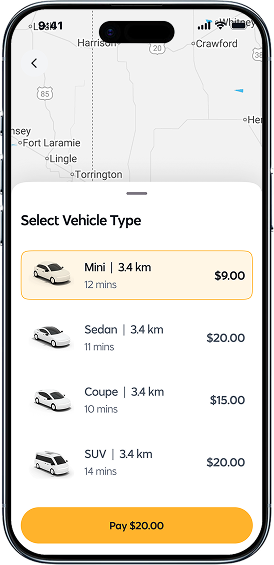
  • Real-Time Vehicle Information

    Each vehicle option displays live details such as distance (3.4 km) and estimated arrival time, helping users make quick decisions.
  • Cab Details

    Access essential information about your cab including their car model, car number etc
  • Clear Pricing for Each Ride Type

    Prices for Mini, Sedan, Coupe, and SUV are shown up front, providing transparent fare comparison at a glance.
  • Highlighted Selected Vehicle

    The currently selected vehicle option is visually highlighted with a colored border, improving clarity and reducing selection errors.
cab_customer_img3
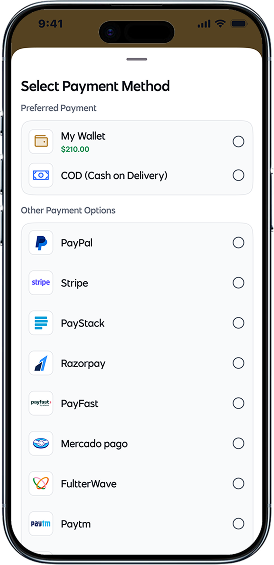
  • Preferred Payment Section

    Displays the user’s most commonly used or convenient payment options such as Wallet Balance and Cash on Delivery, making checkout faster and simpler.
  • Wallet Balance Overview

    Shows available wallet funds at a glance, helping users decide instantly if they want to pay using their wallet.
  • Wide Range of Payment Gateways

    Includes globally trusted platforms like PayPal, Stripe, Razorpay, PayStack, and more — ensuring maximum accessibility for users across regions.
  • Clear Payment Icons for Recognition

    Each payment method includes a recognizable brand icon, making selection easier and improving visual clarity.
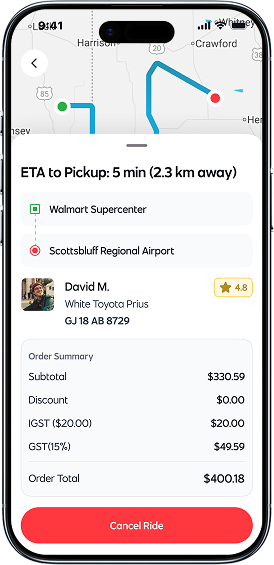
cab_customer_img4
  • Live ETA to Pickup

    Displays real-time estimated arrival (e.g., 5 min, 2.3 km away), giving users clarity and confidence as their driver approaches.
  • Pickup & Drop Location Overview

    Shows both pickup and destination locations in clean cards, helping users quickly verify route accuracy.
  • Route Preview on Map

    A mini-map above the bottom sheet displays the live route, showing the driver’s current position and direction.
  • Vehicle Details for Safety

    Displays car model and license plate (e.g., White Toyota Prius – GJ 18 AB 8729) to ensure riders feel safe and prepared before pickup.
  • Transparent Order Summary

    A detailed breakdown of subtotal, IGST, GST, and total fare keeps users fully informed about pricing.
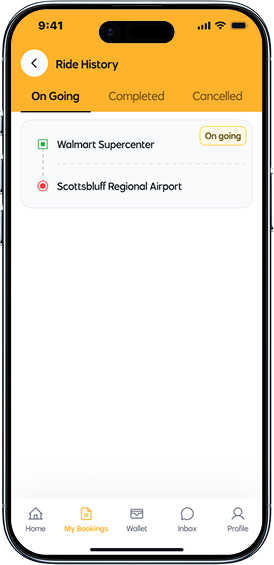
cab_customer_img5
  • Three-Tab Ride Managemen

    Users can switch between On Going, Completed, and Cancelled rides, making it easy to access past and active bookings.
  • Clean Ongoing Ride Card

    Displays active rides in a neat card format, showing essential details without clutter.
  • Pickup & Drop Location Overview

    Both pickup (Walmart Supercenter) and drop-off (Scottsbluff Regional Airport) locations are presented with clear icons and proper visual hierarchy.
  • Live Ride Status Tag

    A small “On Going” badge highlights that the ride is currently active, giving users instant status visibility.
cab_customer_img6
  • Driver Details

    Access essential information about your driver, including their name, photo and ratings.
  • Cab Details

    Access essential information about your cab including their car model, car number etc
  • Payment Details

    Get a breakdown of your cab ride, fare details, discount, tax and tip to transparent experience.
  • Add Review

    Add a review for your driver to share your feedback and help others make informed decisions.
  • Complain

    User can complain against The driver assigned to trip displayed unprofessional behavior.
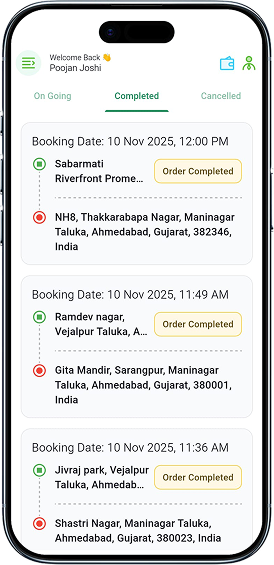
cab_driver_img1
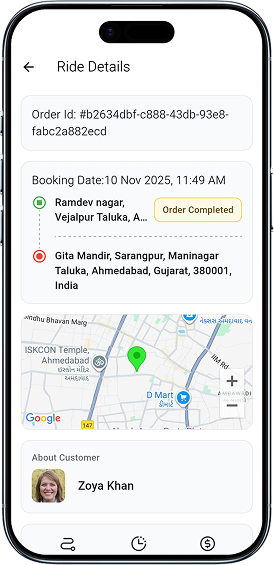
  • Booking Timeline Overview

    Displays each completed booking with its exact date and time, helping users quickly review past rides.
  • Clear Pickup & Drop Details

    Each ride card shows the pickup and drop-off locations with intuitive icons for easy visual recognition.
  • Completion Status Badge

    A prominent “Order Completed” badge confirms that the ride has successfully finished.
  • Organized Ride Cards

    Each completed ride is neatly structured with a dotted journey line and clear text hierarchy for smooth readability.
  • Easy Navigation Between Tabs

    Users can effortlessly switch between On Going, Completed, and Cancelled rides using the top navigation tabs.
cab_driver_img2
  • Live Ride Status Indicator

    A clear In Transit badge highlights that the ride is currently active and in progress, giving users instant status visibility.
  • Pickup Location Overview

    Displays the full pickup address along with the scheduled date and time, ensuring users always know where and when the ride started.
  • Vehicle Type Details

    Shows the selected vehicle (e.g., SUV – 2+1 seater) along with a vehicle image for instant recognition and clarity.
  • Trip Information Summary

    Provides complete package details such as 2 Hour / 55 KM, helping users understand the duration and distance included in the booking.
  • Fare Transparency

    Displays the package cost upfront, ensuring there are no surprises during or after the ongoing ride.
cab_driver_img3
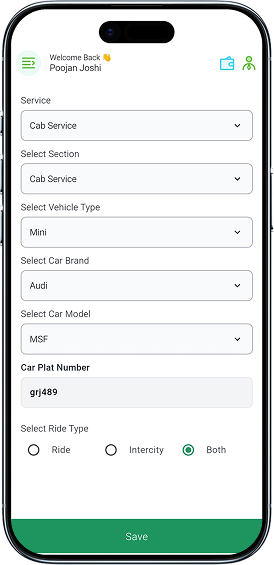
  • Service Selection

    Allows drivers to choose the desired service category, ensuring accurate configuration for cab operations.
  • Vehicle Type Selection

    Choose from multiple vehicle types such as Mini, Sedan, or SUV to match the driver’s actual vehicle.
  • Car Brand & Model Picker

    A simple dropdown interface helps drivers select their vehicle brand and model with ease.
  • Ride Type Options

    Drivers can select whether they want to offer Ride, Intercity, or Both, giving them complete flexibility.
cab_driver_img4
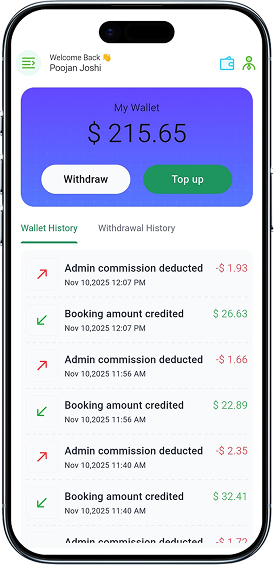
  • Real-Time Wallet Balance Display

    Shows the user’s current wallet balance in a bold, card-style header, giving instant visibility of available funds.
  • Quick Actions: Withdraw & Top Up

    Two prominently placed buttons allow users to easily withdraw money or add funds to their wallet with a single tap.
  • Tabbed Transaction Navigation

    Separate tabs for Wallet History and Withdrawal History help users switch between transaction types effortlessly.
  • Detailed Transaction List

    Each transaction entry clearly displays the type (commission deducted or amount credited), ensuring full financial transparency.
  • Timestamped Records

    Every transaction includes the exact date and time, offering precise bookkeeping and improved trust.
emart-on-demand-image-1
  • Dynamic Slider

    Our slider adapts to your preferences, making every swipe a delightful discovery.
  • Categorized Items

    In this page customer can see vivid variety like appliance, cleaning, painting, cab service etc.
  • Most Popular Services

    A diverse marketplace hub featuring a curated selection of most popular service.
  • View Ratings

    Accessing and evaluating the ratings of service provider.
emart-on-demand-image-2
  • Image Slider

    Product Image Slider feature, designed to elevate your multivendor experience to new heights.
  • Service Details

    From prompt service to expert assistance, our service guarantees convenience, reliability, and satisfaction.
  • Customer Location

    Efficiently connect with our on-demand service by providing your precise location.
  • Worker Details

    Vital information of worker such as experience, ratings, skills, and availability
emart-on-demand-image-3
  • Book Service

    Whether it's plumbing, electrical work, home cleaning, or any other service, our platform connects you.
  • Service Details

    From prompt service to expert assistance you can confirm your service.
  • Customer Location

    Efficiently connect with our on-demand service by providing your precise location.
  • Add Description

    Add a personal touch to your on-demand book service with custom descriptions tailored to your preferences.
  • Date & Slot

    Select your preferred Date & Time Slot to book service conveniently, Assistance tailored to your schedule.
on_demand_customer_img4
  • Booking History

    Keep track of your orders with accessible records of your past orders.
  • Service Details

    Your service reservation, including service type, date, time, and any specific requests you've provided.
  • Date & Slot

    Add to Cart" is a fundamental feature that allowing users to collect items they wish to purchase.
  • Booking Status

    Customer can track the progress of their booked on-demand service.
on_demand_customer_img5
  • Booking Details

    Your service reservation, including service type, date, time, and any specific requests you've provided.
  • About Provider

    Providing comprehensive details about service provider to enhance customer experience.
  • Booking Summary

    It’s give you a quick and detailed overview of your transaction and transparency every step of the way.
  • View Ratings

    Accessing and evaluating the ratings of service provider.
on_demand_worker_img1
  • Booking History

    Keep track of your orders with accessible records of your past orders.
  • Booking Status

    Worker can track the progress of their booked on-demand service.
  • Booking Details

    Booked service by customer, including service type, date, time, and any specific requests you've provided.
  • Date & Slot

    Worker can check Date & Time Slot for booked service conveniently, Assistance tailored to your schedule.
on_demand_worker_img2
  • Booking Details

    Your service reservation, including service type, date, time, and any specific requests you've received.
  • Customer Details

    Providing comprehensive details about customer to enhance customer experience.
  • Booking Summary

    It’s give you a quick and detailed overview of your transaction and transparency every step of the way.
  • Admin Commission

    Commission deduct a percentage-based commission from transactions, ensuring fair revenue distribution.
on_demand_worker_img3
  • Profile Details

    Your profile with essential information such as name, email, profile pic etc.
  • Worker Availability

    Driver can ensures timely enable or disable their availability for work
  • Profile Settings

    Personalize your preferences, manage app theme, app language etc.
  • Logout

    Seamlessly exit your session and safeguard your privacy on our on-demand service app with just a tap.
on_demand_worker_img4
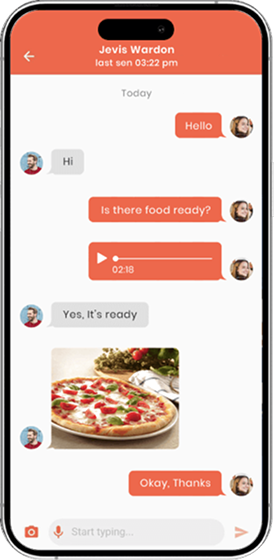
  • Chat with Customer

    Customer can message to assigned Driver within the app for hassle free delivery service.
  • Send Image

    Customer can send image to assigned Driver within the app for hassle free delivery service.
on_demand_provider_img1
  • Booking History

    Keep track of your booking history with accessible records of your past completed service.
  • Booking Status

    Provider can track the progress of their booked on-demand service.
  • Booking Details

    Booked service by customer, including service type, date, time, and any specific requests you've provided.
  • Date & Slot

    Worker can check Date & Time Slot for booked service conveniently, Assistance tailored to your schedule.
on_demand_provider_img2
  • Booking Details

    Your service reservation, including service type, date, time, and any specific requests you've provided.
  • About Customer

    Providing comprehensive details about customer to enhance experience.
  • Booking Summary

    It’s give you a quick and detailed overview of your transaction and transparency every step of the way.
  • Call or Message

    Provider can communicate with customer via call or message for hassle free service.
on_demand_provider_img3
  • Service List

    Get instant access and browse all your comprehensive service List.
  • Service Details

    Add a service details to easy for customer’s seamless and reliable solutions.
  • Delete Service

    This feature allows provider to remove a listed service from their profile with ease.
  • Add Service

    Easily create a service for receiving seamless booking at your fingertips.
on_demand_provider_img4
  • All Workers List

    Discover a diverse array of skilled professionals available at your fingertips with the All Workers List.
  • Worker Details

    Providing comprehensive details about worker like name, email, price etc.
  • Delete Worker

    This feature allows provider to remove a worker for listed workers list.
  • Add Worker

    Add Worker is a feature within our on-demand service app that enables seamless integration.
on_demand_provider_img5
  • Offers List

    Browse our Offers List for exclusive deals and discounts on a wide range of services!
  • Discount Label

    Unlock exclusive savings offers on your favorite service with our Discount Label.
  • Discount Coupon Code

    Simply apply the coupon at checkout and enjoy unbeatable discounts on a wide range of services.
  • View Ratings

    Accessing and evaluating the ratings and reviews provided by other customers.
on_demand_provider_img6
  • Total Balance

    app allows users to store funds within their account for convenient and swift transactions.
  • Transaction History

    App provides users with a comprehensive overview of their past financial transactions.
  • Withdraw Balance

    Securely withdraw earnings from your the app with quick and ease access.
  • Withdraw Balance History

    App provides users with a comprehensive overview of withdraw transactions.
on_demand_provider_img7
  • Chat with Customer

    Service provider can message to customer within the app for hassle free service.
  • Send Image

    Service provider can send image to assigned worker within the app for hassle free service.
Multi Vendor Service
emart-multi-vendor-image-1
  • Dynamic Slider

    Our slider adapts to your preferences, making every swipe a delightful discovery.
  • Categorized Items

    In this page customer can see vivid variety in grocery items category like fruits, vegetables, dairy etc.
  • New Arrivals

    Discover the latest treasures offering our diverse range of vendors!
  • Popular Stores

    a diverse marketplace hub featuring a curated selection of popular stores.
emart-multi-vendor-image-2
  • Image Slider

    Product Image Slider feature, designed to elevate your multivendor experience to new heights.
  • Favorite Product

    With our 'Favorite Product' option, you can effortlessly curate your own personal wishlist within our app.
  • Share Product

    Allows users to easily share details and links to specific products with others to communication channels.
  • Exclusive Offers

    After creating the coupon, you can get list of coupons with discount offer and expired date.
  • Numerous Categories

    Easily categorize items with this feature and help customers to choose and satisfy a craving.
emart-multi-vendor-image-3
  • Product Details

    Product details providing customers with vital information to make informed purchasing decisions.
  • Product Reviews

    Product reviews are the lifeblood of any multivendor app, offering valuable insights for potential buyers.
  • Add to Cart

    Add to Cart" is a fundamental feature that allowing users to collect items they wish to purchase.
  • Store Details

    This section serves as a comprehensive hub of information about a particular store or seller.
emart-multi-vendor-image-4
  • Find Nearest Store

    Discover the convenience of finding the nearest physical store to fulfill your shopping needs.
  • Store Info

    Providing comprehensive details about store to enhance customer experience and foster trust.
  • Location Info

    Location Info for details about the physical location of a product, seller, or service provider.
  • View Ratings

    Accessing and evaluating the ratings and reviews provided by other customers.
emart-multi-vendor-image-5
  • Cart Products

    This section serves as a virtual shopping basket where users can gather items they intend to purchase.
  • Manage Cart

    Customers can conveniently add, remove, or adjust quantities of desired items in their cart.
  • Redeem Coupon

    Simply enter your coupon code at checkout to instantly apply your discount. It's quick & hassle-free.
  • Remarks

    Remarks for as a vital channel for both users and developers to communicate feedback, suggestions.
  • Order Summary

    It’s give you a quick and detailed overview of your transaction and transparency every step of the way.
emart-multi-vendor-image-6
  • Cart Products

    This section serves as a virtual shopping basket where users can gather items they intend to purchase.
  • Manage Cart

    Customers can conveniently add, remove, or adjust quantities of desired items in their cart.
  • Redeem Coupon

    Simply enter your coupon code at checkout to instantly apply your discount. It's quick & hassle-free.
  • Remarks

    Remarks for as a vital channel for both users and developers to communicate feedback, suggestions.
  • Order Summary

    It’s give you a quick and detailed overview of your transaction and transparency every step of the way.
emart-multi-vendor-image-7
  • Offers List

    Browse our Offers List for exclusive deals and discounts on a wide range of products!
  • Discount Label

    Unlock exclusive savings offers on your favorite products with our Discount Label.
  • Discount Coupon Code

    Simply apply the coupon at checkout and enjoy unbeatable discounts on a wide range of products.
  • View Ratings

    Accessing and evaluating the ratings and reviews provided by other customers.
multivendor_store_img1
  • New Order Management

    Easily review all newly placed customer orders with real-time updates, allowing quick decision-making and smooth workflow management.
  • Accept/Reject Orders

    Approve or decline orders instantly based on availability, preparation time, or restaurant capacity — ensuring efficient service handling.
  • Order Details Overview

    View complete order breakdown including item list, quantity, pricing, total amount, and commissions in one clean, organized interface.
  • Customer Information

    Access important customer details such as name, address, and order type (Takeaway/Delivery) to streamline fulfillment.
  • Commission Transparency

    Clear visibility of admin commissions ensures accurate earnings calculation for the restaurant owner.
multivendor_store_img2
  • Detailed Order Breakdown

    Displays a clear and itemized list of all products ordered, along with quantities and pricing for full transparency.
  • Sub Total & Delivery Fee Display

    Presents an accurate calculation of the subtotal and delivery charges, ensuring users understand the complete cost structure.
  • Applied Coupon Discount

    Shows automatically applied coupon savings, helping customers track their discounts in real time.
  • Net Payable Amount

    Highlights the final amount to be paid in a concise, easy-to-read format for quick checkout decisions.
  • View Remarks Section

    Allows users to access special customer instructions or notes to ensure accurate order preparation.
multivendor_store_img3
  • Product Overview Card

    Each product is displayed in a clean, structured card showing the image, name, pricing, rating, and short description for easy management.
  • Product Rating & Reviews

    Displays product rating and number of reviews to help sellers understand customer feedback at a glance.
  • Publish / Unpublish Toggle

    Empowers sellers to control product visibility in real time, enabling quick activation or deactivation of menu items.
  • Delete Product Option

    Allows vendors to remove unwanted or outdated items from their menu with a single tap.
multivendor_store_img4
  • Image Upload for Offer Banner

    Allows sellers to upload a promotional image to visually represent the coupon, making offers more attractive to customers.
  • Flexible Coupon Type Selection

    Choose between Fixed Price Discount or Percentage-Based Discount, giving sellers full control over promotion style.
  • Custom Discount Value

    Enter the exact discount amount based on the selected coupon type for accurate offer creation.
  • Active/Inactive Toggle

    Enable or disable the coupon at any time, allowing sellers to manage limited-time offers instantly.
  • Public/Private Visibility Control

    Choose whether the coupon is visible to all users or restricted to specific customers or campaigns.
multivendor_store_img5
  • Organized Ad Status Tabs

    Easily navigate between Pending, Running, and Expired advertisements for streamlined campaign management.
  • Ad Preview Cards

    Each advertisement is displayed with an image or video preview, helping sellers quickly identify and manage their promotional content.
  • Ad Actions Menu

    A convenient options menu allowing users to Resume, Copy, or Delete ads directly from the card for fast workflow control.
  • Video Ad Support

    Includes built-in video playback with controls, enabling sellers to preview and manage multimedia advertisements.
  • Campaign Details Preview

    Displays key information such as promotion title and offer message, giving a clear snapshot of each ad's purpose.
multivendor_driver_img1
  • Accept / Reject Order Options

    Provides simple, high-visibility buttons for drivers to accept or decline delivery requests instantly.
  • Interactive Map View

    Displays the delivery location and surrounding route on a clean, minimal map interface for quick navigation reference.
  • Pickup & Drop Location Details

    Shows clear information for both the restaurant pickup point and the customer delivery address, ensuring accurate order fulfillment.
  • Trip Distance Calculation

    Automatically calculates and displays the total distance for the delivery route to help drivers understand travel requirements.
  • Delivery Charge Visibility

    Shows the exact delivery fee upfront, helping drivers make quick and informed decisions.
multivendor_driver_img2
  • Order ID Display

    Shows the unique order number at the top, helping drivers quickly identify and verify the correct delivery task.
  • Customer Delivery Details

    Provides the exact delivery address along with a dedicated call button, enabling direct communication if needed.
  • Item Summary Card

    Displays all ordered items with quantities, ensuring drivers deliver the correct products to the customer.
  • Restaurant Information Preview

    Shows the source restaurant and ordered items visually, helping drivers double-check accuracy at a glance.
multivendor_driver_img3
  • Order ID Display

    Shows a unique order identifier for quick tracking and reference, helping users easily locate past orders.
  • Order Status Indicator

    A clear status label (Completed) displayed in green to visually confirm successful delivery at a glance.
  • Pickup Location Details

    Shows the restaurant name and address, providing a traceable record of where the order originated.
  • Delivery Destination Information

    Displays the customer’s delivery address, ensuring complete clarity of the order’s delivery route.
multivendor_driver_img4
  • Comprehensive Order Summary

    Displays the order number, total item count, and order value upfront, giving users a quick overview of the purchase.
  • Delivery Status Badge

    A clear, color-coded indicator (Delivered) that instantly communicates the completion status of the order.
  • Pickup & Delivery Information

    Shows both the restaurant’s address and the delivery destination in a connected visual flow, ensuring full clarity of the delivery route.
  • Itemized Order Details

    Provides a detailed breakdown of all ordered items with quantities and product images, helping users verify their purchase.
  • Transparent Billing Breakdown

    Shows item total, delivery fee, discounts, and the final payable amount with clear formatting for easy understanding.
multivendor_driver_img5
  • Total Balance Overview

    Displays the user’s current wallet balance in a visually highlighted section for instant financial insight.
  • Withdraw & Top-Up Actions

    Provides quick access buttons to withdraw earnings or add funds, enabling smooth and simple wallet management.
  • Tabbed Wallet Navigation

    Separate tabs for Transaction History, Withdrawal History, and Top-Up History help users access financial records effortlessly.
  • Transaction Filter Options

    Allows users to filter transactions by time period (e.g., Daily, Weekly, Monthly), improving data visibility and navigation.
  • Detailed Transaction Cards

    Each entry displays transaction type, date, time, and amount earned or spent, ensuring complete clarity of financial activity.
eCommerce Service
emart-e-commerce-cust-image-1
  • Category Quick Access

    Horizontal category icons enable fast navigation to popular product segments such as Men’s Wear, Watches, Ladies Wear, Jewellery, and Shoes.
  • Promotional Offer Banner

    A visually engaging promo card highlights ongoing discounts and limited-time offers, encouraging users to explore deals.
  • New Arrivals Section

    Showcases trending and newly added products with high-quality images and key details to capture user interest instantly.
  • Shop Cards with Ratings

    Product/Store cards display images, brand names, locations, and star ratings to help users make informed shopping decisions.
  • Wishlist Shortcut

    A heart icon on each product card lets users quickly add items to their wishlist for later purchase.
emart-e-commerce-cust-image-2
  • Store Banners

    A visually appealing header image showcases the store’s theme and product style, enhancing brand identity.
  • Store Information Section

    Displays store name, address, distance, and rating details clearly, helping users evaluate the shop at a glance.
  • Live Store Status

    Shows whether the store is currently Open, along with a quick link to view store timings for planning purchases.
  • Special Offers for You

    Highlights personalized deals and coupon codes, encouraging users to take advantage of ongoing discounts.
  • Product Card with Quick Add

    Each product card includes pricing, discount, rating, and a quick “Add” button for fast shopping.
emart-e-commerce-cust-image-3
  • Saved Delivery Address

    Displays the user’s selected delivery location at the top for quick confirmation, with an option to expand and change the address easily.
  • Product List with Variants

    Shows all items added to the cart along with product variants (like size or volume), ensuring clarity before checkout.
  • Quantity Selector

    A smooth +/– control allows users to adjust item quantities directly within the cart for fast updates.
  • Delivery Type Options

    Allows users to choose between delivery methods such as Instant Delivery or Standard, offering flexibility and convenience.
  • Offers & Benefits Section

    A dedicated section for applying coupons and viewing promotional benefits to maximize savings.
emart-e-commerce-cust-image-4
  • Order Status Tabs

    Organized tabs for All, In Progress, Delivered, and Rejected orders help users filter and manage their purchase history effortlessly.
  • Order Summary Cards

    Each order card displays product image, item name, quantity, status, and total price, offering a quick snapshot of the order details.
  • Real-Time Status Labels

    Clear indicators like In Progress and Delivered allow users to instantly understand the current stage of each order.
  • Track Order Option

    Provides real-time tracking for ongoing orders, enabling customers to monitor delivery progress with ease.
emart-e-commerce-cust-image-5
  • Detailed Order Summary

    Displays the order number, total items, and amount clearly, helping users quickly understand their purchase information.
  • Delivery Status Badge

    A visible “Delivered” label confirms the successful completion of the order, giving users instant clarity.
  • Pickup & Delivery Information

    Shows the store address and customer delivery location in a connected visual flow, enhancing transparency and tracking.
  • Product Overview Section

    Lists each ordered product with an image, quantity, and variant details such as size, ensuring accuracy for the customer.
  • Bill Breakdown

    A clear cost summary showing item totals, delivery fee, discounts, and final payable amount for complete price transparency.
e-commerce_store_img1
  • Order List

    App provides users with a comprehensive overview of their past purchases and order history.
  • Order Details

    app typically include comprehensive information about a customer's purchase.
  • Delivery Location

    The address where you'd like your items delivered for your order reaches you promptly and conveniently.
  • Order Status

    Tracker is your personal assistant in keeping you informed about every step of your order status.
e-commerce_store_img2
  • Product List

    The store owner can view the list of product which is listed by store owner
  • Delete Product

    Sellers with the capability to remove products from the platform's inventory
  • Publish/Unpublish Product

    The Publish/Unpublish Product feature empowers sellers to control the visibility of their products.
  • Add Product

    Effortlessly introduce new items to their virtual storefront, enriching the variety and appeal.
e-commerce_store_img3
  • Offers List

    Browse our Offers List for exclusive deals and discounts on a wide range of products!
  • Discount Price

    Unlock exclusive savings offers on your favorite products with our Discount Price.
  • Discount Coupon

    The Publish/Unpublish Simply apply the coupon at checkout and enjoy unbeatable discounts on a wide range of products.
  • Create Offer

    Seamlessly generate promotions, discounts, and exclusive deals to attract customers and boost sales.
e-commerce_store_img4
  • Coupon Code

    Effortlessly create custom codes to boost sales and enhance customer engagement.
  • Coupon Types

    Unlock savings with our diverse range of coupon types of fix price or percentage offer.
  • Coupon Expires

    Unlock exclusive savings with our limited-time coupon codes.
  • Activate or Deactivate Coupon

    Effortlessly manage discounts with our Activate or Deactivate Coupon feature
e-commerce_store_img5
  • Withdraw Payment

    Securely withdraw earnings from your the app with quick and ease access.
  • Wallet Balance

    app allows users to store funds within their account for convenient and swift transactions.
  • Transaction History

    app provides users with a comprehensive overview of their past purchases and financial transactions.
Parcel Service
emart-parcel-image-1
  • Personalized User Greeting

    Displays the user’s name and saved address to create a familiar and personalized parcel booking experience.
  • Service Highlight Banner

    A visually appealing promo banner introduces the parcel service as a trusted delivery partner with clear, friendly messaging.
  • Category-Based Parcel Options

    Users can choose from multiple parcel types such as documents, electronics, furniture, medicines, gifts, and files—making selection quick and intuitive.
  • Secure Document Delivery

    A dedicated option for delivering important paperwork safely and efficiently.
emart-parcel-image-2
  • Flexible Delivery Type Selection

    Users can choose between As soon as possible or Scheduled delivery, providing full control over pickup and drop-off timing.
  • Scheduled Date & Time Picker

    When scheduling a delivery, users can select pickup and arrival date/time through intuitive calendar inputs for precise planning.
  • Parcel Image Upload

    Allows users to upload a parcel photo (jpg, jpeg, png) to help delivery partners identify items easily and avoid mistakes.
  • Optimized for Quick Booking

    The flow minimizes steps while still capturing essential information, making the document booking process efficient and stress-free.
emart-parcel-image-3
  • Sender & Receiver Address Details

    Displays complete pickup and delivery addresses, including names, phone numbers, and exact scheduled timings for full clarity.
  • Pickup & Delivery Timings Overview

    Shows clearly defined pickup and drop-off time slots, helping users verify the accuracy of scheduled deliveries before confirming.
  • Delivery Metrics Snapshot

    Provides quick insights into key delivery details—distance, parcel weight, and estimated delivery rate—in a visually simple, icon-based layout.
  • Coupon Code & Redeem Option

    Users can enter discount codes and redeem them instantly, allowing cost savings at the final confirmation step.
  • Transparent Billing Summary

    Breaks down the subtotal, taxes (IGST, GST), and final payable amount, ensuring complete cost transparency.
emart-parcel-image-4
  • Organized Parcel History Tabs

    Users can switch between In Transit, Delivered, and Cancelled tabs, offering a clear and intuitive way to track all parcel statuses.
  • Real-Time Delivery Status Tag

    A visible status label shows “In Transit” to instantly inform users about the current stage of their delivery.
  • Sender Address Overview

    Displays complete pickup details including sender name, address, phone number, and pickup time for quick reference.
  • Receiver Address Overview

    Shows receiver’s name, delivery address, contact information, and expected delivery time for better tracking and transparency.
emart-parcel-image-5
  • Live Delivery Status Indicator

    A clear “In Transit” badge instantly shows the current stage of the delivery, helping users understand progress at a glance.
  • Complete Pickup & Delivery Details

    Both sender and receiver information — including name, address, phone number, and scheduled times — are neatly organized for easy review.
  • Parcel Type Information

    Shows the type of parcel being delivered (e.g., Documents), ensuring clarity for both users and delivery partners.
  • Delivery Metrics Overview

    Important delivery details like distance, parcel weight, and rate are highlighted with icons for fast and intuitive understanding.
  • Detailed Order Summary

    Breakdown of subtotal, discounts, and taxes (IGST, GST) provides transparency before the final payment or review.
parcel_shipper_img1
  • Driver Availability

    Driver can ensures timely enable or disable their availability for work
  • Trip Distance

    It helps driver gauge the length of their journey and is a crucial factor in determining the fare for the ride.
  • Pickup and Drop-off Location

    Our Pickup and Drop-off Location for cab service offers easy access for drivers alike.
  • Accept or Reject Request

    Swiftly Accept or Reject incoming ride requests, ensuring flexibility and control over your schedule.
parcel_shipper_img2
  • Sender and Reciever Details

    Verify essential sender and receiver information for a secure and pleasant parcel service experience.
  • Customer Destination

    Your destination for hassle-free parcel delivery. Enjoy swift, reliable, and secure shipping to your doorstep.
  • Call or Message

    Driver can communicate with sender and receiver via call or message for hassle free delivery service.
  • Track Route Via Map

    Efficiently navigate parcel deliveries with our Track Route Via Map feature.
parcel_shipper_img3
  • Orders History

    Keep track of your orders with accessible records of your past orders.
  • Customer Details

    This section gathers essential information about sender and receiver availing service.
  • Pickup and Drop-off locations

    Shipper can view pickup and drop-off locations of parcel order.
  • Parcel Details

    Providing essential information package dimensions, weight, and any special handling instructions.
parcel_shipper_img4
  • Order Details

    Keep track of your journey with accessible records of your past rides
  • Customer Details

    Easily view past trips customer detail like name, image, dates, destinations, fares, and driver information.
  • Parcel Details

    Providing essential information package dimensions, weight, and any special handling instructions.
  • Order Summary

    A concise overview detailing of your booking total amount, discount, tax.
parcel_shipper_img5
  • Total Balance

    app allows users to store funds within their account for convenient and swift transactions.
  • Transaction History

    App provides users with a comprehensive overview of their past financial transactions.
  • Withdraw Balance

    Securely withdraw earnings from your the app with quick and ease access.
  • Withdraw Balance History

    App provides users with a comprehensive overview of withdraw transactions.
Rental Service
rental_customer_img1
  • Auto-Detected Current Location

    Displays the user’s current location automatically, helping them start the booking process quickly and accurately.
  • Vehicle Type Selection

    A clear list of available vehicle options (Mini, Sedan, Coupe, SUV), each displaying distance, expected arrival time, and price.
  • Transparent Pricing Details

    Each vehicle card highlights its price upfront, helping users compare and choose based on their budget.
  • Select Date Option

    A dedicated date picker allows users to schedule rides for later, supporting both immediate and planned bookings.
  • Distance & ETA Indicators

    Shows the distance of each available vehicle and the estimated time to reach the user, improving decision-making.
rental_customer_img2
  • Multiple Time & Distance Packages

    Users can choose from tailored ride packages such as 2 Hours / 20 Km or 1 Day / 80 Km, depending on their needs.
  • Clear Pricing for Each Package

    Every preference option prominently displays its price, helping users compare and select quickly.
  • Short Descriptions for Guidance

    Each package includes a helpful one-line description (e.g., “Ideal for small personal tasks”) to guide users based on use-case.
  • Flexible Ride Options

    Packages support different trip types — short errands, quick travel, half-day plans, or full-day excursions — enhancing versatility.
rental_customer_img3
  • Pickup Location & Time Summary

    Shows the selected pickup location along with the exact date and time, allowing users to quickly verify their starting point before confirming.
  • Selected Preference Overview

    Displays the chosen rental package (e.g., 2 Hours / 20 Km) along with its price and a short description, ensuring clarity on what the user has opted for.
  • Vehicle Details & Rental Dates

    Includes the selected vehicle type (Mini, Sedan, etc.), its approximate arrival time, and the rental duration dates for complete transparency.
  • Clear Order Summary Breakdown

    Itemized pricing including subtotal, discounts, IGST, GST, and the final payable amount, helping users understand the cost structure easily.
rental_customer_img4
  • Preferred Payment Section

    Displays the user’s most commonly used or convenient payment options such as Wallet Balance and Cash on Delivery, making checkout faster and simpler.
  • Wallet Balance Overview

    Shows available wallet funds at a glance, helping users decide instantly if they want to pay using their wallet.
  • Wide Range of Payment Gateways

    Includes globally trusted platforms like PayPal, Stripe, Razorpay, PayStack, and more — ensuring maximum accessibility for users across regions.
  • Clear Payment Icons for Recognition

    Each payment method includes a recognizable brand icon, making selection easier and improving visual clarity.
rental_driver_img1
  • Quick Ride Search Bar

    Allows users to instantly search for ongoing, past, or upcoming rides, improving navigation and usability.
  • Rider Information Card

    Displays the customer’s name clearly at the top of the card, helping drivers or service providers identify the booking at a glance.
  • Accurate Pickup Location Details

    Shows full address information with a location icon, providing clarity on where the ride begins.
  • Package Details Overview

    Highlights package duration and included distance (e.g., 2 Hours | 55 KM) to quickly remind users of the ride’s key terms.
  • Fare & Date Summary

    Shows the total payable amount along with the scheduled service date, making the ride summary complete and transparent.
rental_driver_img2
  • Live Ride Status Indicator

    A clear In Transit badge highlights that the ride is currently active and in progress, giving users instant status visibility.
  • Pickup Location Overview

    Displays the full pickup address along with the scheduled date and time, ensuring users always know where and when the ride started.
  • Vehicle Type Details

    Shows the selected vehicle (e.g., SUV – 2+1 seater) along with a vehicle image for instant recognition and clarity.
  • Package Information Summary

    Provides complete package details such as 2 Hour / 55 KM, helping users understand the duration and distance included in the booking.
  • Fare Transparency

    Displays the package cost upfront, ensuring there are no surprises during or after the ongoing ride.
rental_driver_img3
  • Booking ID & Quick Copy Option

    Displays the unique booking ID with a one-tap copy icon, making it easy for users to share or reference their booking details.
  • Pickup Location & Date Summary

    Shows the exact pickup address along with the scheduled date, ensuring users have complete clarity about their ride’s starting point.
  • Selected Package Overview

    Highlights the chosen rental package (2 Hour / 55 KM) along with its price and a short package description for instant reference.
  • Customer Information Section

    Displays customer details such as name, email, and phone number in a clean, dedicated block — making communication easy and accessible.
  • Rental Details Breakdown

    Provides a detailed summary of the rental package, included kilometers, and pricing — ensuring users fully understand what is covered.
rental_driver_img4
  • Real-Time Wallet Balance Display

    Shows the user’s current wallet balance in a bold, card-style header, giving instant visibility of available funds.
  • Quick Actions: Withdraw & Top Up

    Two prominently placed buttons allow users to easily withdraw money or add funds to their wallet with a single tap.
  • Tabbed Transaction Navigation

    Separate tabs for Wallet History and Withdrawal History help users switch between transaction types effortlessly.
  • Detailed Transaction List

    Each transaction entry clearly displays the type (commission deducted or amount credited), ensuring full financial transparency.
  • Timestamped Records

    Every transaction includes the exact date and time, offering precise bookkeeping and improved trust.
Cab Service
cab_customer_img1
  • Smart Location Display

    Shows the user’s active location at the top, helping them quickly verify where the ride booking will start.
  • Promotional Banners

    Eye-catching banners showcase offers like Affordable Rides at Your Fingertips, encouraging users to explore deals and services.
  • Ride Category Selection

    Two clear ride types — City Rides and Intercity/Outstation — help users choose the right option based on their travel needs.
  • Safety Assurance Section

    A dedicated message stating Every Ride. Every Driver. Verified. builds trust by emphasizing driver background checks and user safety.
cab_customer_img2
  • Real-Time Vehicle Information

    Each vehicle option displays live details such as distance (3.4 km) and estimated arrival time, helping users make quick decisions.
  • Cab Details

    Access essential information about your cab including their car model, car number etc
  • Clear Pricing for Each Ride Type

    Prices for Mini, Sedan, Coupe, and SUV are shown up front, providing transparent fare comparison at a glance.
  • Highlighted Selected Vehicle

    The currently selected vehicle option is visually highlighted with a colored border, improving clarity and reducing selection errors.
cab_customer_img3
  • Preferred Payment Section

    Displays the user’s most commonly used or convenient payment options such as Wallet Balance and Cash on Delivery, making checkout faster and simpler.
  • Wallet Balance Overview

    Shows available wallet funds at a glance, helping users decide instantly if they want to pay using their wallet.
  • Wide Range of Payment Gateways

    Includes globally trusted platforms like PayPal, Stripe, Razorpay, PayStack, and more — ensuring maximum accessibility for users across regions.
  • Clear Payment Icons for Recognition

    Each payment method includes a recognizable brand icon, making selection easier and improving visual clarity.
cab_customer_img4
  • Live ETA to Pickup

    Displays real-time estimated arrival (e.g., 5 min, 2.3 km away), giving users clarity and confidence as their driver approaches.
  • Pickup & Drop Location Overview

    Shows both pickup and destination locations in clean cards, helping users quickly verify route accuracy.
  • Route Preview on Map

    A mini-map above the bottom sheet displays the live route, showing the driver’s current position and direction.
  • Vehicle Details for Safety

    Displays car model and license plate (e.g., White Toyota Prius – GJ 18 AB 8729) to ensure riders feel safe and prepared before pickup.
  • Transparent Order Summary

    A detailed breakdown of subtotal, IGST, GST, and total fare keeps users fully informed about pricing.
cab_customer_img5
  • Three-Tab Ride Managemen

    Users can switch between On Going, Completed, and Cancelled rides, making it easy to access past and active bookings.
  • Clean Ongoing Ride Card

    Displays active rides in a neat card format, showing essential details without clutter.
  • Pickup & Drop Location Overview

    Both pickup (Walmart Supercenter) and drop-off (Scottsbluff Regional Airport) locations are presented with clear icons and proper visual hierarchy.
  • Live Ride Status Tag

    A small “On Going” badge highlights that the ride is currently active, giving users instant status visibility.
cab_customer_img6
  • Driver Details

    Access essential information about your driver, including their name, photo and ratings.
  • Cab Details

    Access essential information about your cab including their car model, car number etc
  • Payment Details

    Get a breakdown of your cab ride, fare details, discount, tax and tip to transparent experience.
  • Add Review

    Add a review for your driver to share your feedback and help others make informed decisions.
  • Complain

    User can complain against The driver assigned to trip displayed unprofessional behavior.
cab_driver_img1
  • Booking Timeline Overview

    Displays each completed booking with its exact date and time, helping users quickly review past rides.
  • Clear Pickup & Drop Details

    Each ride card shows the pickup and drop-off locations with intuitive icons for easy visual recognition.
  • Completion Status Badge

    A prominent “Order Completed” badge confirms that the ride has successfully finished.
  • Organized Ride Cards

    Each completed ride is neatly structured with a dotted journey line and clear text hierarchy for smooth readability.
  • Easy Navigation Between Tabs

    Users can effortlessly switch between On Going, Completed, and Cancelled rides using the top navigation tabs.
cab_driver_img2
  • Live Ride Status Indicator

    A clear In Transit badge highlights that the ride is currently active and in progress, giving users instant status visibility.
  • Pickup Location Overview

    Displays the full pickup address along with the scheduled date and time, ensuring users always know where and when the ride started.
  • Vehicle Type Details

    Shows the selected vehicle (e.g., SUV – 2+1 seater) along with a vehicle image for instant recognition and clarity.
  • Trip Information Summary

    Provides complete package details such as 2 Hour / 55 KM, helping users understand the duration and distance included in the booking.
  • Fare Transparency

    Displays the package cost upfront, ensuring there are no surprises during or after the ongoing ride.
cab_driver_img3
  • Service Selection

    Allows drivers to choose the desired service category, ensuring accurate configuration for cab operations.
  • Vehicle Type Selection

    Choose from multiple vehicle types such as Mini, Sedan, or SUV to match the driver’s actual vehicle.
  • Car Brand & Model Picker

    A simple dropdown interface helps drivers select their vehicle brand and model with ease.
  • Ride Type Options

    Drivers can select whether they want to offer Ride, Intercity, or Both, giving them complete flexibility.
cab_driver_img4
  • Real-Time Wallet Balance Display

    Shows the user’s current wallet balance in a bold, card-style header, giving instant visibility of available funds.
  • Quick Actions: Withdraw & Top Up

    Two prominently placed buttons allow users to easily withdraw money or add funds to their wallet with a single tap.
  • Tabbed Transaction Navigation

    Separate tabs for Wallet History and Withdrawal History help users switch between transaction types effortlessly.
  • Detailed Transaction List

    Each transaction entry clearly displays the type (commission deducted or amount credited), ensuring full financial transparency.
  • Timestamped Records

    Every transaction includes the exact date and time, offering precise bookkeeping and improved trust.
On-demand Service
emart-on-demand-image-1
  • Dynamic Slider

    Our slider adapts to your preferences, making every swipe a delightful discovery.
  • Categorized Items

    In this page customer can see vivid variety like appliance, cleaning, painting, cab service etc.
  • Most Popular Services

    A diverse marketplace hub featuring a curated selection of most popular service.
  • View Ratings

    Accessing and evaluating the ratings of service provider.
emart-on-demand-image-2
  • Image Slider

    Product Image Slider feature, designed to elevate your multivendor experience to new heights.
  • Service Details

    From prompt service to expert assistance, our service guarantees convenience, reliability, and satisfaction.
  • Customer Location

    Efficiently connect with our on-demand service by providing your precise location.
  • Worker Details

    Vital information of worker such as experience, ratings, skills, and availability
emart-on-demand-image-3
  • Book Service

    Whether it's plumbing, electrical work, home cleaning, or any other service, our platform connects you.
  • Service Details

    From prompt service to expert assistance you can confirm your service.
  • Customer Location

    Efficiently connect with our on-demand service by providing your precise location.
  • Add Description

    Add a personal touch to your on-demand book service with custom descriptions tailored to your preferences.
  • Date & Slot

    Select your preferred Date & Time Slot to book service conveniently, Assistance tailored to your schedule.
on_demand_customer_img4
  • Booking History

    Keep track of your orders with accessible records of your past orders.
  • Service Details

    Your service reservation, including service type, date, time, and any specific requests you've provided.
  • Date & Slot

    Add to Cart" is a fundamental feature that allowing users to collect items they wish to purchase.
  • Booking Status

    Customer can track the progress of their booked on-demand service.
on_demand_customer_img5
  • Booking Details

    Your service reservation, including service type, date, time, and any specific requests you've provided.
  • About Provider

    Providing comprehensive details about service provider to enhance customer experience.
  • Booking Summary

    It’s give you a quick and detailed overview of your transaction and transparency every step of the way.
  • View Ratings

    Accessing and evaluating the ratings of service provider.
on_demand_worker_img1
  • Booking History

    Keep track of your orders with accessible records of your past orders.
  • Booking Status

    Worker can track the progress of their booked on-demand service.
  • Booking Details

    Booked service by customer, including service type, date, time, and any specific requests you've provided.
  • Date & Slot

    Worker can check Date & Time Slot for booked service conveniently, Assistance tailored to your schedule.
on_demand_worker_img2
  • Booking Details

    Your service reservation, including service type, date, time, and any specific requests you've received.
  • Customer Details

    Providing comprehensive details about customer to enhance customer experience.
  • Booking Summary

    It’s give you a quick and detailed overview of your transaction and transparency every step of the way.
  • Admin Commission

    Commission deduct a percentage-based commission from transactions, ensuring fair revenue distribution.
on_demand_worker_img3
  • Profile Details

    Your profile with essential information such as name, email, profile pic etc.
  • Worker Availability

    Driver can ensures timely enable or disable their availability for work
  • Profile Settings

    Personalize your preferences, manage app theme, app language etc.
  • Logout

    Seamlessly exit your session and safeguard your privacy on our on-demand service app with just a tap.
on_demand_worker_img4
  • Chat with Customer

    Customer can message to assigned Driver within the app for hassle free delivery service.
  • Send Image

    Customer can send image to assigned Driver within the app for hassle free delivery service.
on_demand_provider_img1
  • Booking History

    Keep track of your booking history with accessible records of your past completed service.
  • Booking Status

    Provider can track the progress of their booked on-demand service.
  • Booking Details

    Booked service by customer, including service type, date, time, and any specific requests you've provided.
  • Date & Slot

    Worker can check Date & Time Slot for booked service conveniently, Assistance tailored to your schedule.
on_demand_provider_img2
  • Booking Details

    Your service reservation, including service type, date, time, and any specific requests you've provided.
  • About Customer

    Providing comprehensive details about customer to enhance experience.
  • Booking Summary

    It’s give you a quick and detailed overview of your transaction and transparency every step of the way.
  • Call or Message

    Provider can communicate with customer via call or message for hassle free service.
on_demand_provider_img3
  • Service List

    Get instant access and browse all your comprehensive service List.
  • Service Details

    Add a service details to easy for customer’s seamless and reliable solutions.
  • Delete Service

    This feature allows provider to remove a listed service from their profile with ease.
  • Add Service

    Easily create a service for receiving seamless booking at your fingertips.
on_demand_provider_img4
  • All Workers List

    Discover a diverse array of skilled professionals available at your fingertips with the All Workers List.
  • Worker Details

    Providing comprehensive details about worker like name, email, price etc.
  • Delete Worker

    This feature allows provider to remove a worker for listed workers list.
  • Add Worker

    Add Worker is a feature within our on-demand service app that enables seamless integration.
on_demand_provider_img5
  • Offers List

    Browse our Offers List for exclusive deals and discounts on a wide range of services!
  • Discount Label

    Unlock exclusive savings offers on your favorite service with our Discount Label.
  • Discount Coupon Code

    Simply apply the coupon at checkout and enjoy unbeatable discounts on a wide range of services.
  • View Ratings

    Accessing and evaluating the ratings and reviews provided by other customers.
on_demand_provider_img6
  • Total Balance

    app allows users to store funds within their account for convenient and swift transactions.
  • Transaction History

    App provides users with a comprehensive overview of their past financial transactions.
  • Withdraw Balance

    Securely withdraw earnings from your the app with quick and ease access.
  • Withdraw Balance History

    App provides users with a comprehensive overview of withdraw transactions.
on_demand_provider_img7
  • Chat with Customer

    Service provider can message to customer within the app for hassle free service.
  • Send Image

    Service provider can send image to assigned worker within the app for hassle free service.

Discover What’s New

Stay ahead of the curve with our newest additions, designed to enhance your app experience and streamline your interactions.
  • null
    Dynamic Color Selection
  • null
    QR Scanner
  • null
    Multilingual Support with RTL
  • null
    Multiple Payment Gateways

Multi-Service Integration

Access multiple services like cabs, parcel delivery, and more, all in one app.
  • null
    Unified platform for various services
  • null
    Easy switching between services
  • null
    Quick booking with pre-saved details
  • null
    Separate order history for each service
  • null
    Single payment system for all services

Easy Location & Address Management

Access multiple services like cabs, parcel delivery, and more, all in one app.
  • null
    Add favorite locations (Home, Work, etc.)
  • null
    Auto-detect current location with GPS
  • null
    One-tap address input during booking
  • null
    Manage and update saved addresses
  • null
    Pin exact locations on the map for accurate pickup/drop-off

eMart: All-in-One Multi Vendor & Service Apps

Explore versatile apps tailored to meet every need, from booking cabs to delivering parcels, renting essentials, and beyond.

Seamless Multi-Vendor Marketplace

Shop across multiple vendors with a variety of services in one place.
  • null
    Browse multiple vendor listings
  • null
    Compare prices and offerings
  • null
    Secure payments across all vendors
  • null
    Real-time service tracking
  • null
    Instant notifications for orders

One-Stop eCommerce Solution

Shop products from fashion to electronics, delivered right to your doorstep.
  • null
    Wide range of products
  • null
    Easy product search and filter
  • null
    Secure payment options
  • null
    Order tracking and updates
  • null
    Customer reviews and ratings
  • null
    Wishlist and favorites

Quick & Secure Parcel Delivery

Send documents, electronics, gifts, and more with reliable parcel services.
  • null
    Multiple parcel categories (documents, electronics, etc.)
  • null
    Real-time parcel tracking
  • null
    Secure packaging options
  • null
    Easy pickup and drop-off scheduling
  • null
    Door-to-door service

Flexible Rental Solutions

Rent anything from cars to tools and equipment, at your convenience.
  • null
    Wide range of rental categories
  • null
    Flexible booking durations
  • null
    Detailed rental agreements
  • null
    Easy booking and return options
  • null
    In-app communication with providers
  • null
    Affordable pricing and discounts

Hassle-Free Cab Booking

Book a cab anytime, anywhere with just a few taps.
  • null
    Multiple ride options (Sedan, SUV, etc.)
  • null
    Real-time driver tracking
  • null
    Estimated fare preview
  • null
    Safe and secure rides
  • null
    24/7 customer support

Your Personal On-Demand Services

Access services like cleaning, beauty, repair, and more right at your doorstep.
  • null
    Book a wide range of home services
  • null
    Professional and vetted providers
  • null
    Service scheduling and management
  • null
    Affordable service rates
  • null
    Real-time updates and tracking
  • null
    Secure payment gateways

Revolutionize Your Marketplace with eMart: The All-Inclusive Solutions

eMart empowers your marketplace with a comprehensive suite of features to deliver a seamless user experience and optimize vendor success.

Modular Design, Endless Possibilities

Build your dream app with customizable modules for any service.
  • null
    Parcel Service
  • null
    Car Rental Service
  • null
    Multi-vendor Service
  • null
    E-Commerce
  • null
    Cab Service
  • null
    On Demand

Ready-to-Launch Delivery Solutions

Get your on-demand service up and running instantly with our pre-built delivery apps.
  • null
    Delivery Man app
  • null
    Customer app
  • null
    Admin Panel
  • null
    Store App
  • null
    Web Site/Landing Page

Experience Convenience at Every Step

Secure payments, manage orders, chat with vendors – it’s a breeze.

Wide Service Selection

From car rentals to food delivery, eMart offers a vast network of on-demand services to fulfill your daily needs.

Trusted Vendor Network

We partner only with the most reliable and highly-rated vendors, ensuring exceptional service quality.

Simplified Search & Booking

Find the service you need quickly and easily with our intuitive search bar and clear booking processes.

Real-Time Progress Tracking

Never miss an update! Track your orders in real-time and receive estimated arrival times directly within the app.

Multiple Secure Payment Options

Choose your preferred payment method from a variety of secure and trusted gateways for a worry-free experience.

Order Management & History

Easily access past orders, reorder frequently used services, and manage your account information effortlessly.

In-App Communication

Stay connected! Communicate directly with vendors through the app for any questions or special requests.

Promotional Offers

Unlock exclusive discounts, participate in loyalty programs for using eMart - the more you use, the more you gain!

Constantly Expanding Services

eMart is dedicated to providing you with ever-growing options. We're always adding new vendors and services to your evolving needs.

Power Elite

Author on Codecanyon

1700+

Product Sales

5 Star

Ratings and Reviews

Best

Customer Support

All-in-One
  • Installation & Setup Service
– From Server to Customization, We’ve Got You Covered

Purchase and Sit Back, we will handle the rest 

Testimonials from Satisfied Customers

Discover what our customers have to say about their experiences with our products and services.
4.9 Star Ratings

Laustin1

Not only is the quality of the code great. The Support around this product is amazing, some of the best support that I have gotten. They not only have quick responses but quick to solve the issues I have come across. the product itself has a wide array of detail that makes it very customizable to suit your needs. Im looking forward into discovering more amazing detail about this product. I definitely made the right choice!
For Customer Support
nbsinfos1

One the truly very best customer support and easy to install script
For Customer Support
yousti007

The team supported me throughout the installation and deployment process of the solution.
Always there to answer my questions.
For Customer Support
ahmedfarid995

the support team are the best that i have ever seen , in fact siddhiinfosoft are trustworthy and what an excellent app , no needing to coding skills at all.
For Customer Support
viewmediaeg

I am writing to express my sincere appreciation for the outstanding technical support provided by the siddhiinfosoft team. As a developer utilizing their programming code, I have experienced unparalleled assistance and professionalism from their support team. From the initial inquiry to the resolution of my technical issues, the siddhiinfosoft support team demonstrated a profound understanding of their product and a commitment to ensuring customer satisfaction.

For Customer Support
joelak15

Amazing App system
post-purchase support is very responsive !
thanks you
For Customer Support
yousti007

The team supported me throughout the installation and deployment process of the solution.
Always there to answer my questions.
For Customer Support
bramhanandareddy

Code quality is good and when I receive any problem the customer support is very good thank you team.
Limited Time Offer:

Get eMart for Just $89 on Codecanyon!

Unlock the power of eMart App at an unbeatable price. Hurry, grab this special deal now!